
Reusable skills from practice
Hermes turns repeated successful work into reusable skills instead of waiting for manual teaching.
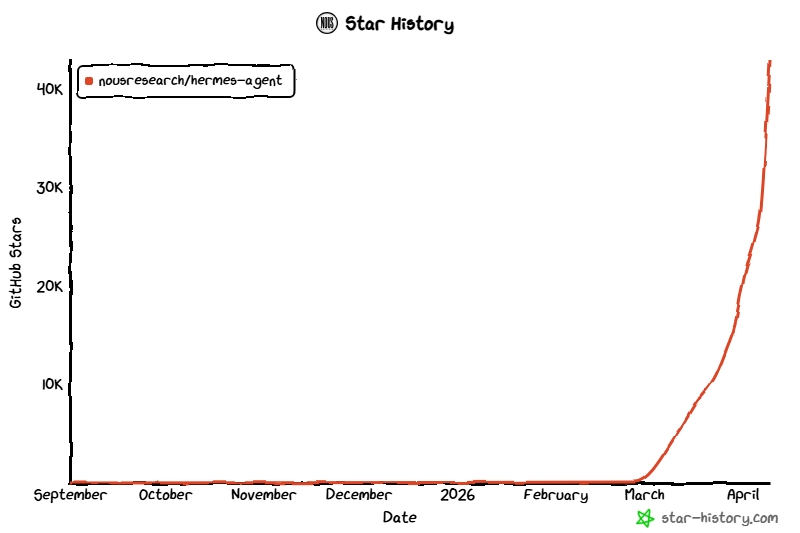
See the growth first, then decide whether to open managed hosting or keep comparing Hermes with OpenClaw and other deploy paths.
Hermes turns repeated successful work into reusable skills instead of waiting for manual teaching.
A clearer fit when you want a runtime-first model with skills, memory, and flexible deployment.
Hermes can power browser frontends like Open WebUI through its API.
LiveFaceSwap AI is one of the products we build, improve, and operate through Hermes Agent workflows. It carries that deeply embedded agent workflow into real-time visual AI, with live face swap, try-on, and restyle in the browser, plus virtual-camera workflows through LiveFaceSwap Desktop.
Use only likenesses and camera feeds you own or have permission to use.
Open your camera, choose a reference image you have permission to use, and compare the original feed with the live AI output.
Move between different real-time visual AI experiences in one workspace.
When you need desktop-app output, continue with LiveFaceSwap Desktop.
An AI agent from Nous Research and a strong OpenClaw alternative for teams that want durable memory, self-improving skills, and flexible deployment.
Hermes can distill reusable skills from repeated work and improve through practice, instead of relying on you to teach every workflow by hand.
You can run Hermes locally, in Docker, on a VPS, or expose it through its API for other frontends and tools.
Hermes keeps useful context over time, so the agent does not start from zero every time you come back.
If you already know OpenClaw, Hermes is the stronger fit when you want a more runtime-focused model with skills, memory, and flexible deployment.
The appeal is not just that Hermes can answer questions. It can stay close to the environment, remember useful context, and become more operationally valuable as teams keep using it.
If you already know OpenClaw, the real question is whether you want a more persistent, self-hosted runtime that can live closer to systems, accumulate skills, and fit different deployment shapes more naturally.
Hermes is built around persistence and accumulated operating context. That matters once the work spans multiple sessions or machines.
Local install, Docker, VPS, and managed paths all map naturally to Hermes. It fits teams that care where the runtime lives.
Hermes is stronger when repeated workflows become reusable skills. That makes the system more valuable over time.
If your agent needs to stay close to repos, services, and automation, Hermes is the more natural model.
We support the self-serve paths developers expect, and managed cloud hosting is already live for teams that want less infrastructure work.
Fastest way to validate Hermes on your own machine with the official install script.
Best when you want a cleaner runtime boundary and a repeatable containerized setup.
Best when Hermes should stay online continuously and live near real services.
Best when you want Hermes available without owning the runtime operations yourself.
Answers to the questions visitors usually ask when they are trying to understand Hermes Agent, compare it with OpenClaw, connect it to Open WebUI, and choose a deployment path.
If you are still deciding, start with the product-definition questions first, then choose the lowest-friction deployment path that lets you validate Hermes in your own workflow.
Start with the fastest path for your workflow, then move to Docker, VPS, or managed cloud hosting when Hermes needs a longer-lived runtime.