
Pick Hermes Agent
Best for an agent runtime, API backend, automation, and reusable skills.
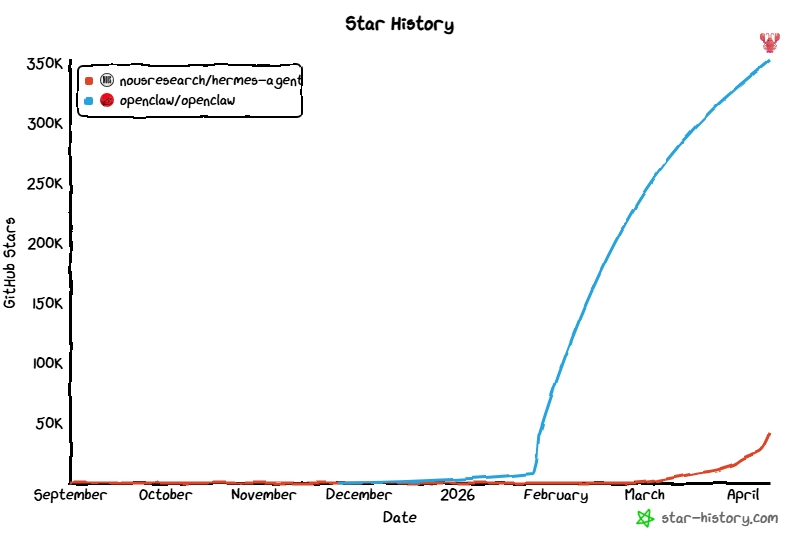
Two of the fastest-growing open-source AI agent projects on GitHub.
Best for an agent runtime, API backend, automation, and reusable skills.
Best for a personal AI assistant, browser UI, WebChat, voice, and chat-first daily use.
Hermes is a direct OpenClaw alternative with stronger emphasis on memory, reusable skills, automation, and API/backend leverage.
Official messaging centers the runtime, memory, skills, tools, and backend leverage.
Official docs center the personal assistant experience, browser UI, WebChat, voice, and device flows.
Hermes highlights persistent memory plus auto-generated skills as a core differentiator.
OpenClaw ships Control UI and WebChat directly; Hermes points browser users toward API-connected frontends.
Hermes exposes an OpenAI-compatible API server for Open WebUI, LobeChat, LibreChat, and custom clients.
If OpenClaw is the familiar baseline, this is where Hermes has to earn the switch. The table below makes the overlap and the later-entry advantages explicit: deeper memory compounding, reusable skills, stronger automation posture, and cleaner backend reuse.
An agent that grows with you: a self-improving runtime with persistent memory, auto-generated skills, tools, subagents, and automation features.
A personal AI assistant you run on your own devices; the Gateway is the always-on control plane, but the assistant experience is the product.
This is the root difference behind almost every other comparison point on the page.
Hermes keeps built-in persistent memory and can add deeper user modeling; it also emphasizes that successful work can become reusable skills.
OpenClaw keeps stateful sessions, memory, and tools so the assistant becomes more useful over time, but the focus stays on assistant continuity rather than skill accumulation as the headline.
If you want memory to compound into reusable behavior, Hermes is making a stronger promise.
Hermes official docs highlight 40+ tools, skill loading, auto-generated skills, cron scheduling, webhooks, browser automation, and isolated subagents.
OpenClaw highlights tools, reminders, browser automation, message routing, plugins, mobile nodes, and TaskFlow-style integrations.
Both automate; Hermes leans more into agent-runtime composition, while OpenClaw leans more into assistant workflows and channel-centric coordination.
Hermes ships a full terminal UI and messaging gateway; for browser experiences it exposes an OpenAI-compatible API server that frontends like Open WebUI or LobeChat can connect to.
OpenClaw ships first-class browser surfaces through Control UI and WebChat, plus a macOS companion app and mobile-node workflows with voice and Canvas on supported platforms.
If a built-in browser assistant surface matters on day one, this is one of the clearest practical differences.
Hermes documents Telegram, Discord, Slack, WhatsApp, Signal, Email, and CLI access from a single gateway, with webhooks for external systems.
OpenClaw documents built-in and plugin channels across WhatsApp, Telegram, Slack, Discord, Signal, iMessage, WebChat, Matrix, Teams, Zalo, and more.
Both are channel-capable, but OpenClaw is putting more product weight on the assistant living across those surfaces.
Hermes exposes an OpenAI-compatible API server so the same runtime can power Open WebUI, LobeChat, LibreChat, NextChat, ChatBox, or your own integrations.
OpenClaw is a self-hosted gateway with its own Control UI, WebSocket surfaces, provider system, and plugins. It can use OpenAI-compatible providers, but the product center is still the assistant itself.
If you want one runtime to sit behind many client surfaces or product ideas, Hermes is the cleaner fit.
Hermes ships an official `hermes claw migrate` path that imports memory, persona, workspace instructions, models, channels, and selected keys from an OpenClaw setup.
OpenClaw remains its own product and can still be the better fit if you prefer its assistant-first model, built-in web UI, or channel-focused workflow.
Migration support lowers switching cost; it does not mean Hermes sits underneath OpenClaw.
On this query, both products qualify. The more useful question is whether you want a self-hosted assistant product or a self-hosted agent runtime that can also power other interfaces.
If your mental model is “I want my own assistant in chat, WebChat, voice, and browser UI,” OpenClaw matches that intent more directly from its official docs and product surfaces.
If your mental model is “I want an agent layer I can automate, integrate, and place behind OpenAI-compatible frontends,” Hermes is the clearer match.
Step 1: Decide whether you are shopping for an assistant surface or an agent runtime.
Step 2: Test the surface you actually care about instead of only reading feature lists.
Step 3: If runtime leverage matters more than interface polish, run Hermes locally and check whether skills, memory, API reuse, and automation change your workflow.
Migrate only if you want the runtime model, not because the names sound adjacent. Hermes already ships official migration guidance and importer tooling for OpenClaw users, but the point is to make switching easier for the right users, not to suggest that Hermes sits underneath OpenClaw.
Hermes official docs and homepage emphasize persistent memory, skills, subagents, cron, toolsets, messaging platforms, and the OpenAI-compatible API server.
Read Hermes featuresOpenClaw official docs define it as a personal AI assistant you run on your own devices, with a gateway, stateful sessions, memory, tools, broad channels, and plugin surfaces.
Read OpenClaw FAQOpenClaw ships its own browser Control UI and WebChat, which is one of the clearest day-one differences versus Hermes’ CLI-plus-API posture.
Read Control UI docsHermes ships an official migration guide and importer for OpenClaw setups, including memory, persona, workspace instructions, selected channels, and selected secrets.
Read migration guideQuestions people usually ask before they compare a self-hosted AI assistant with an agent runtime, or consider switching from OpenClaw to Hermes.
If the page still feels abstract, validate the fit by testing the surface you actually care about: browser assistant UX for OpenClaw, or runtime/API/automation leverage for Hermes.